Smart Vending Machines: AI Cabinets and Software
How smart vending and AI cabinets work: recognition methods, product fit, software and payment layers, and how to specify a project.
Quick answer: 1950×2700×350 mm · 100 W · 220–240 V AC, 50 Hz
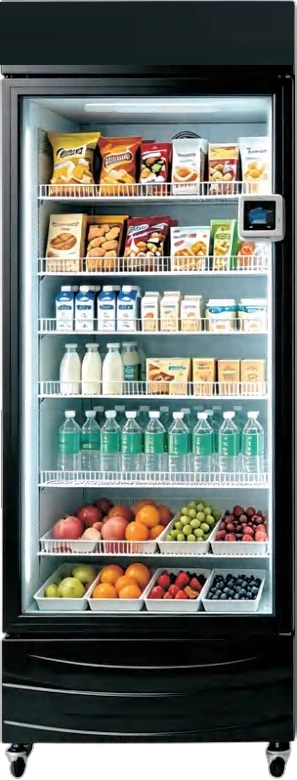
A smart vending machine is a self-service cabinet that knows what left the shelf. Instead of relying on a spiral to drop a known SKU, it identifies the item the customer takes — by camera, weight, RFID or an assigned door — and charges the account. That single change opens product categories that a traditional coil machine cannot handle: unpacked bakery, boxed meals, cosmetics, electronics and branded merchandise.
The category is crowded with labels. Smart vending machine, AI vending machine, vending cabinet, smart vending cabinet, self-service vending cabinet, open-display cabinet, visual recognition machine and gravity cabinet are often used for overlapping products. This guide separates the hardware formats from the recognition methods, then shows how to specify a project that can actually be operated. The lockers and smart cabinets line is the product family behind most of the examples, and the product overview maps the neighbouring formats.
What is a smart vending machine?
A smart vending machine combines three layers: a cabinet that can be opened or selected, a recognition layer that records the item, and a software layer that reconciles stock, payment and machine health. The cabinet may be a closed locker bank, a glass-door fridge or an open shelf.
The defining feature is not the screen. It is the transaction record. A machine with a touchscreen but a fixed spiral is still a traditional machine with a nicer interface; the 55-inch touchscreen cabinet is a good example of a large display on a conventional delivery system. A machine that lets the customer open a door, take an item and walk away — with the item and the account matched automatically — is a smart cabinet, such as the NFC smart fridge.
Is a smart vending cabinet different from a vending machine?
Yes, in the same way a staffed shelf differs from a closed display case. A traditional spiral or elevator machine controls access to one product at a time. A smart cabinet usually controls access to a compartment or to the whole cabinet, then identifies what was taken.
| Feature | Traditional spiral or elevator | Smart open-display cabinet |
|---|---|---|
| Product access | One slot or one elevator cycle | Door, compartment or open shelf |
| Product envelope | Limited by coil or platform | Wider, including irregular packaging |
| Recognition | Slot mapping | Camera, weight, RFID or door assignment |
| Shrink control | Physical containment | Recognition plus account and audit trail |
| Assortment change | Reload and reconfigure slots | Restock the shelf; update the catalogue |
| Best fit | High-volume uniform SKUs | Mixed, high-value or unpacked products |
The trade-off is not automatic. An open-display cabinet is faster to restock and more flexible in assortment, but it depends on recognition accuracy and a payment identity. A locker bank sits between the two: the door assignment is simple and reliable, but the customer must choose a specific compartment.
What recognition methods do smart cabinets use?
Four methods dominate. Each has a different failure mode, and the failure mode matters more than the marketing name.
| Method | How it works | Good fit | Main limit |
|---|---|---|---|
| Visual recognition | Cameras compare before-and-after shelf images | Packaged snacks, drinks, boxed goods, cosmetics | Similar packaging, poor lighting, occlusion |
| Weight sensing | Shelf or cabinet measures the weight delta | Uniform-weight items, refillable containers | Similar weights, spilled or moved stock |
| RFID | Tag on each item is read at the cabinet | High-value goods, apparel, electronics | Tag cost and application labor |
| Door assignment | Each door maps to one SKU or order | Fresh food, flowers, pharmacy, parcels | One item per door, slower assortment change |
A visual recognition cabinet is the most flexible for retail packaging, but it needs a clean shelf image and consistent lighting. A gravity cabinet is simpler and cheaper to run, but it works best when each SKU has a distinct weight. RFID gives the strongest identity, at the cost of tagging every unit. Door assignment is the most deterministic, which is why it is common in pharmacy cabinets and in the refrigerated locker range.
How does visual recognition work in practice?
The cabinet camera captures the shelf before the door opens and after it closes. The software compares the two images, detects which facing changed, and maps the change to a SKU and a price. The customer sees the charge in the app or on the screen.
Accuracy depends on the product mix. Two bags of the same chips in different flavors can look identical to a camera; a boxed meal with a clear label is easier. Ask the supplier how the model is trained, how new SKUs are added, and what happens when a product is moved to a different shelf position. A system that needs a factory visit for every planogram change is not ready for a real route. For boxed food, compare the recognition cabinet with a bento box machine that controls the package mechanically.
How does a gravity or weight-based cabinet work?
A gravity cabinet measures the weight change on a shelf. If one item of a known weight is removed, the system charges that SKU. It is mechanically simple and works well for canned drinks, fixed-weight packs and refill containers.
The weakness is ambiguity. If two products have similar weights, the system cannot tell them apart. If a customer moves an item between shelves, the weight delta may be misread. Weight sensing is best used with a disciplined planogram and a product list where each SKU is physically distinct. For canned and bottled drinks, a conventional snack and beverage cabinet is often the more economical route.
Which products suit an open-display cabinet?
Open-display formats work when the product is attractive on a shelf and the recognition layer can identify it. Good candidates include packaged snacks, bottled drinks, boxed meals, cosmetics, phone accessories, branded merchandise and seasonal gift sets. The specialty retail line covers many of these formats, including cosmetics cabinets and general merchandise cabinets.
Fresh food needs a refrigerated zone and a closed or door-locked format; the fresh food line covers the heated and chilled platforms. Flowers need a display cabinet with temperature control and enough height for bouquets; the 24-door flower cabinet is a locker-format example. Pharmacy needs lock control and an audit trail, which is a different requirement from retail recognition — the pharmacy and health line explains the access model.
The product list decides the format. If the best-selling item is a rigid box that cannot survive a drop, an open-display or locker cabinet is the natural choice. If the item is a can sold fifty times a day, a spiral machine is still faster and cheaper per transaction. The selection framework sets out the full comparison.
What software does a smart cabinet need?
The software has four jobs: identify the item, charge the customer, update stock, and report machine health. A cloud platform should show sales by SKU and by site, alert on stockouts and failed transactions, and let the operator change prices and planograms remotely. The software line describes the standard stack.
The recognition layer adds two requirements. First, an audit trail: every transaction should store the evidence used to charge the customer, whether an image, a weight delta or a door event. Second, a dispute workflow: the operator needs a way to review and refund a charge without editing the database by hand. Ask for a demonstration of both before the order.
Integration matters as much as features. If the project already has a loyalty app, an ERP or a payment gateway, the cabinet should expose events and accept commands through an API. A closed platform that cannot connect to the operator’s systems becomes a second dashboard.
What payment and identity options are required?
A smart cabinet usually needs a digital identity before it needs a payment terminal. The customer may be identified by a member account, a QR code, a card, a pickup code or a staff badge. The cabinet then charges the linked account or opens the assigned door.
For public retail, card and QR payment are the baseline; the payment options guide explains how to choose modules by market. For staff or resident schemes, an account or badge may replace payment at the cabinet. For pharmacy pickup, the identity is the prescription or order number, and the payment may happen at the pharmacy counter. If the project needs a module that is not in the standard kit, the OEM scope covers the integration work.
Confirm three things: how the customer is identified, how the charge is authorized, and what happens when the network is down. A smart cabinet that cannot sell offline is a single point of failure in a public location.
What should you check before buying a smart cabinet?
Test the recognition with your actual product list, not the supplier’s demonstration set. Bring the most similar-looking SKUs, the smallest and largest packages, and the products with reflective or dark packaging. Ask how many SKUs the system can hold and how often the model needs retraining.
Ask for the false-charge rate in a real deployment, not a laboratory. Ask who pays for a wrong charge and how the customer gets a refund. Ask what happens when a product is out of stock: does the shelf image still recognize the facing, or does the system need a planogram update?
Check the physical serviceability too. Can the shelves be removed for cleaning? Can the camera module be replaced without returning the cabinet? Is the door lock rated for the number of cycles the site will produce? A smart cabinet is still a machine that must be maintained.
When does a smart cabinet beat a traditional machine?
A smart cabinet wins when the product mix is broad, the packaging is irregular, the value per item is high, or the site needs a self-service store rather than a single-product vendor. It also wins when restocking speed matters: an open shelf can be filled faster than a spiral cabinet.
A traditional machine wins when the SKUs are uniform and high-volume, the site is price-sensitive, and the product can survive a drop. In many routes the two coexist: a spiral or elevator machine for drinks and snacks, and a smart cabinet for fresh food, gifts or high-value items. The micro market guide explains the larger format that combines both, and the cost guide shows how the budget compares. Retail venues and transport hubs are the most common mixed deployments; the retail venue solution and the mall blind-box and flower case show the pattern.
For a project review, share the product list, the site type and the payment method with the VendHarbor team through the contact page. If the format is still open, compare the vending locker guide and the residential smart fridge deployment before fixing the cabinet type.
Next step
Turn this guide into a configured machine
Send the product list, site conditions and target volume. We reply with a configuration, lead time and quotation — usually within one business day.
Machines mentioned in this article
FlagshipLockers & smart cabinets
NFC AI Smart Fridge
Open the door, take the item and charge the account automatically.
View details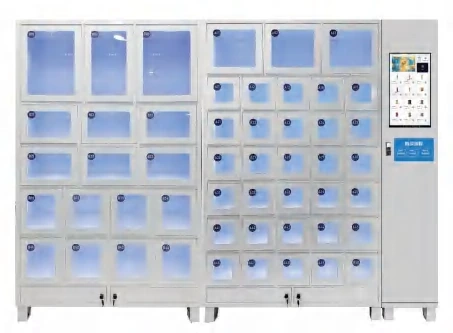 Flagship
Lockers & smart cabinets
50-Compartment Locker Vending Machine
Fifty independent doors in a 350 mm-deep cabinet.
View details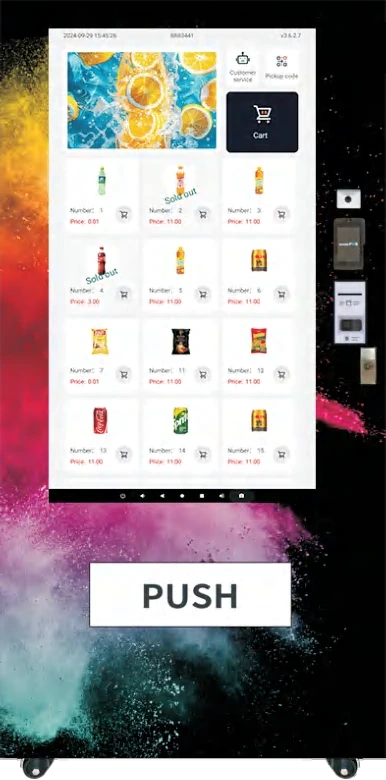 Flagship
Snacks & drinks
55-Inch Touchscreen Vending Machine
A full-height 55-inch display turns the cabinet into a retail media surface.
View details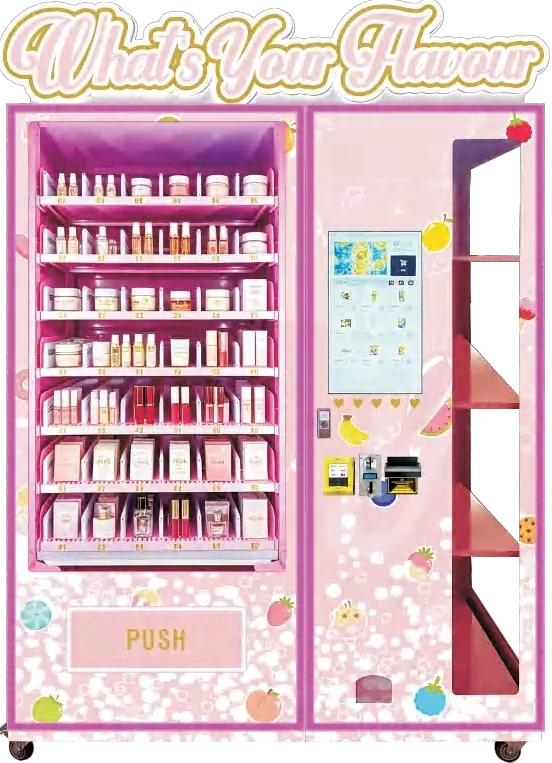
Specialty & custom
Cosmetics Vending Machine
300-SKU beauty retail with glass display and controlled access.
View configuration