Vending Machine Payment Options by Market
How to choose payment modules by market: card, QR, coin, note and account systems, settlement, offline behavior and serviceability.
Quick answer: 1942×1096×790 mm · +4°C to +25°C · 550 W
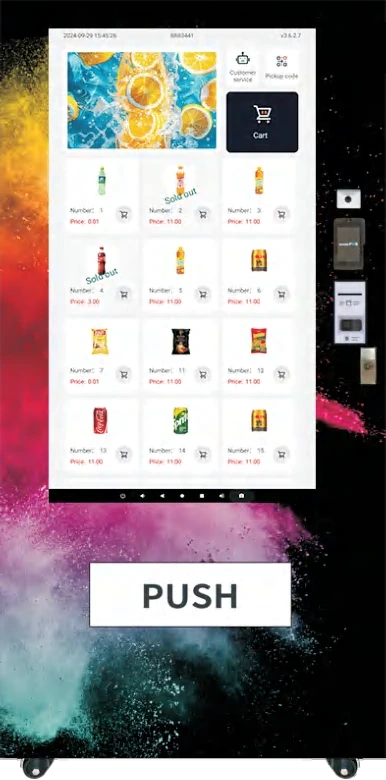
Payment is where the vending machine meets the local market. A cabinet that works perfectly in one country can fail in another because the payment module does not match customer habits. The hardware is similar; the integration is not.
This guide explains the common payment options, the questions to ask a supplier, and the offline behavior that determines whether a route is reliable. The snack and beverage line and the locker and smart cabinet line share the same payment interface family; the product overview shows the full range.
What payment methods are common on vending machines?
- Card: contactless and chip cards, usually through an acquirer or payment terminal.
- QR: local wallets such as Alipay, WeChat Pay, PromptPay, PayNow, UPI or a bank QR scheme.
- Coin and note: still relevant in markets with cash-heavy habits and in sites without reliable connectivity.
- Account: staff badges, student cards, resident accounts or app-based wallets.
- NFC/RFID: used in smart fridges and locker pickup, where the account is charged after taking the product.
A machine can support more than one method. The practical limit is the number of modules that can fit in the cabinet and the complexity the route team can service. A 60-slot touchscreen cabinet has more room for modules than a compact cabinet; a 55-inch model adds a larger customer interface for QR and card prompts.
How do you choose the right mix for a market?
Start with the customers, not the catalog. A transport hub serves locals, tourists and commuters; an office serves staff with a company account; a hospital serves patients and visitors who may not have the local wallet. The payment mix should cover the majority of these groups without overloading the cabinet.
Ask three questions:
- What do customers use today at nearby shops and vending machines?
- Which methods can be settled in the local currency?
- Which methods can be serviced locally if a module fails?
If the site is a tourist area, card and QR are usually both needed. If the site is a staff canteen, an account system may be more convenient than a card reader; the office and factory solution covers badge and account schemes. If the site has poor connectivity, coin and note may still be necessary as a fallback. Transport sites often need the widest mix; the transit hub solution explains why.
What does settlement involve?
A payment module is only half of the system. The other half is the merchant account, gateway and settlement process. For card payments, the acquirer charges a fee and settles to a bank account. For QR payments, the wallet provider or aggregator handles settlement. For account-based systems, the operator settles internally.
Ask the supplier who provides the merchant account in your country. A machine shipped with a card reader does not automatically include a local merchant account. The buyer usually needs a local entity or a payment partner. If the project needs a module that is not in the standard kit, the OEM scope covers the integration work, and the software platform handles the gateway and settlement reporting.
How should offline behavior work?
A vending machine should keep selling when the network drops. The terminal stores the transaction locally and syncs when the connection returns. The details matter:
- Is there a limit on offline transactions?
- Does the terminal accept the payment or decline it when offline?
- How are refunds handled after a sync conflict?
- How does the cloud platform flag missing transactions?
For account-based systems, offline behavior is more complex because the balance may be stored in the cloud. The terminal may need a local cache or a pre-authorized spending limit. The NFC smart fridge and the locker bank are typical account-based formats. Confirm the behavior before the site goes live.
How do you compare payment modules?
Compare modules on five points:
| Point | What to ask |
|---|---|
| Certification | Is the module certified for the destination market? |
| Settlement | Who is the acquirer or wallet aggregator? |
| Integration | Does it use a standard protocol such as MDB or a proprietary SDK? |
| Serviceability | Can the module be replaced locally? |
| Cost | What is the transaction fee, and who pays it? |
A module that is cheap to buy but expensive to settle is not cheap. A module that works only with the supplier’s gateway can lock the operator into a single provider.
What about refunds and failed deliveries?
A vending transaction has two failure points: payment and delivery. The machine should handle both. If the product fails to dispense, the customer should receive an automatic refund or a credit, and the event should be logged for the route team.
Ask how the machine detects a failed delivery. A sensor in the pickup bin, a motor current check or a camera can all work, but each has limits. The refund rule should be written into the operating procedure, not left to the customer to complain. In a pharmacy or fresh food cabinet, the refund is tied to a pickup record rather than a delivery sensor; the pharmacy cabinet range shows the access model.
How does payment affect the rest of the machine?
Payment is not isolated. It affects the screen flow, the offline sales logic, the stock deduction and the reporting. A cashless-only machine can be simpler, but it may exclude customers. A multi-payment machine is more inclusive, but it needs a clear service and reconciliation routine. A coffee platform and a bento box cabinet in the fresh food line both sit behind the same payment decision, but the refund rules differ. A general merchandise cabinet may need a different price and refund policy again.
The best configuration is the one the route team can support. A machine with four payment methods and no local service partner is less reliable than a machine with two methods and a clear settlement path. The cost guide shows how payment choices affect the installed cost, and the selection framework shows where payment fits in the specification.
Payment is a local integration project disguised as a hardware option. Choose the methods customers use, confirm settlement and offline behavior, and keep the module serviceable. The rest of the machine will follow. The micro market guide covers the basket-checkout model, and the smart cabinet guide covers account-based recognition. The office coffee and lunch case and the hospital pharmacy case show two different payment identities in practice; the transit interchange case shows a high-volume cashless mix. For a market-specific payment review, contact the VendHarbor team with the destination country and customer group, and compare the locker pickup flow if the project is account-based.
Next step
Turn this guide into a configured machine
Send the product list, site conditions and target volume. We reply with a configuration, lead time and quotation — usually within one business day.
Machines mentioned in this article
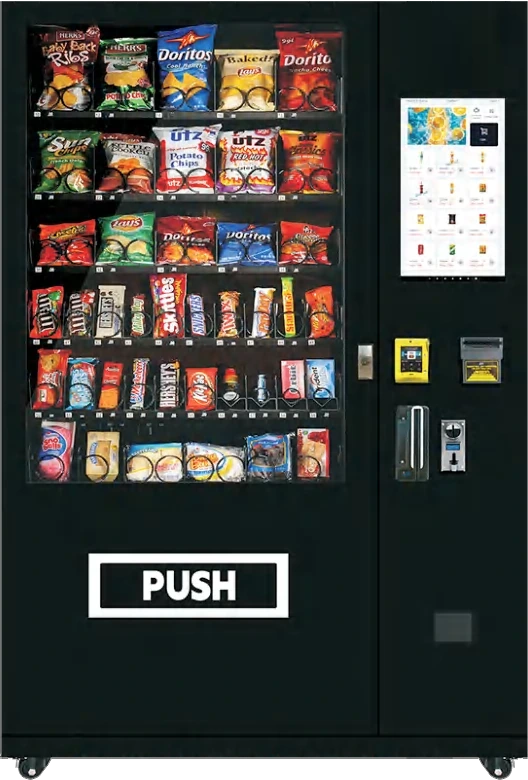 Flagship
Snacks & drinks
60-Slot Touchscreen Vending Machine
Six shelves, 300 items and a 7.1-inch touchscreen for drinks and snacks.
View details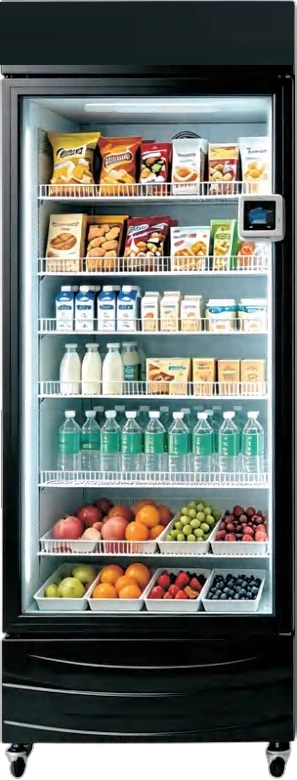 Flagship
Lockers & smart cabinets
NFC AI Smart Fridge
Open the door, take the item and charge the account automatically.
View details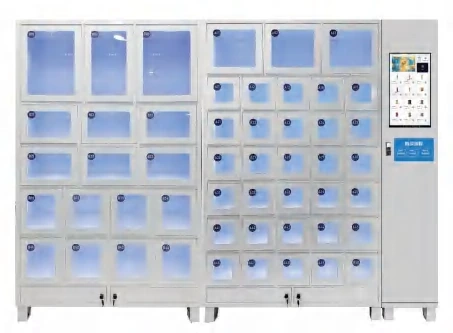 Flagship
Lockers & smart cabinets
50-Compartment Locker Vending Machine
Fifty independent doors in a 350 mm-deep cabinet.
View details