How Much Does a Vending Machine Cost?
What drives vending machine price, how machine classes compare on budget, and how to read a quotation without comparing a bare cabinet.
Quick answer: 1942×1096×790 mm · +4°C to +25°C · 550 W
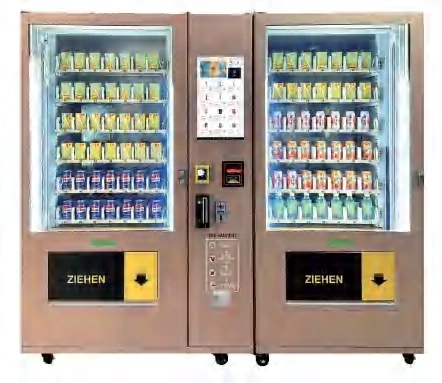
A vending machine has no list price in the way a consumer appliance does. It is a configured piece of retail equipment: the same cabinet shell can be built with a spiral shelf or an elevator, one cooling zone or two, a button panel or a 21.5-inch touchscreen, and a payment kit chosen for the destination market. The quotation changes with every one of those decisions.
That is why two buyers can compare “the same machine” and see a large gap. This guide explains what sits inside the price, how machine classes compare on budget, and how to compare quotations on equal terms. Start with the product overview if you are still mapping the categories.
Why is there no single price for a vending machine?
A vending machine is priced as a bill of materials plus assembly, testing and documentation. The cabinet is visible; the cost is spread across the parts you cannot see. The control board family, the refrigeration plant, the delivery mechanism, the lock system and the payment interface all move independently.
A 60-slot button machine and a 54-slot elevator machine may occupy a similar footprint. The elevator adds a carriage, a motor, sensors and a different control sequence. It also changes the product envelope and the transaction time. The price difference buys a different operating capability, not a bigger box.
What are the main cost drivers?
The first driver is the cabinet and its sheet-metal structure: size, gauge, insulation, door system and finish. The second is the delivery system: spiral, elevator, conveyor or locker doors. The third is cooling. An ambient cabinet is a different product from a chilled cabinet, and a frozen cabinet is different again. The snack and beverage line covers the first two decisions; the fresh food line covers heated and refrigerated platforms.
Capacity and screen size come next. More shelves and more slots add material and assembly time. A large touchscreen adds a display, a controller and content work — the 60-slot touchscreen cabinet is a good example of how screen size and slot count combine. Then comes the payment kit: card reader, QR scanner, coin and note modules, each with its own certification and integration effort.
Product format also changes the cabinet. A bento box cabinet needs upright delivery and a different shelf layout from a flower compartment cabinet, where each door holds a complete bouquet. A coffee platform adds brewing, water and cleaning systems that a packaged-goods cabinet does not carry.
Finally, there are the items that rarely appear on a comparison sheet: certification testing, packaging, manuals, spare-parts kit, software account and freight terms. The software platform is usually quoted as an account rather than a hardware line, and the OEM scope determines how much of the cabinet is standard. A machine quoted ex-works with no payment module is not the same offer as a delivered machine with a working payment stack.
How do machine classes compare on budget?
The table below is a planning aid, not a price list. It shows which classes sit at the entry, middle or high end of a factory’s range, and what moves the number within each class.
| Machine class | Typical product set | Budget position | What moves the quote |
|---|---|---|---|
| Button spiral cabinet | Cans, PET bottles, bagged snacks | Entry | Slot count, cooling range, payment kit |
| Touchscreen spiral or elevator | Mixed snacks and drinks, fragile packs | Mid | Screen size, delivery system, shelf layout |
| Combo or master-slave | High-volume snacks plus drinks | Mid to high | Number of cabinets, one or two payment terminals |
| Refrigerated locker | Fresh food, flowers, pharmacy packs | High | Door count, refrigeration, lock control, audit software |
| Smart open-display cabinet | Unpacked or high-value goods | High | Recognition hardware, camera count, software integration |
A combo elevator machine usually costs less than two independent machines because the cabinets share one payment terminal and one control system. A master-slave combination follows the same logic at a larger capacity, and a multi-function combo adds more product zones to the same footprint. A refrigerated locker costs more per item stored because every door has a lock, a sensor and a software identity; the locker range shows where ambient and chilled formats diverge.
Which options move the quotation most?
Options are where budgets drift. A screen upgrade, a second cooling zone, an extra payment module and a custom color can each be justified; together they can turn an entry machine into a mid-range project. The table below shows the options that most often change the total.
| Option | Effect on cost | When it is worth it |
|---|---|---|
| Elevator instead of spiral | Adds mechanism, motor and control work | Fragile, heavy or irregular products |
| Refrigeration instead of ambient | Adds compressor, insulation and test time | Chilled drinks, fresh food, flowers, pharmacy |
| 21.5-inch or larger touchscreen | Adds display, controller and content production | High-footfall sites with product discovery |
| Card plus QR plus cash | Adds modules, certification and settlement work | Markets where customers use more than one method |
| Custom color, logo and light box | Adds setup and minimum order quantity | Brand-controlled routes and distributor programs |
| Extended spare-parts kit | Adds cost at order, reduces downtime later | Remote sites and first-time operators |
The cheapest way to buy a machine is to specify only what the site will use. The most expensive way is to buy a stripped machine and add modules after it lands.
What does the machine cost over its service life?
Purchase price is the first cheque, not the total cost. Add freight and duty, unloading and installation, payment transaction fees, software subscription, spare parts, service labor, restocking and the cost of lost sales when the machine is down.
A machine that fails a delivery once a week costs more than its price difference against a more reliable model. A cabinet that is too small forces extra restocking visits. A payment module that customers do not use reduces transactions without appearing on any invoice. The route planning guide shows how service intervals and capacity interact.
Cooling is the other long-term cost. A chilled cabinet running in a hot corridor uses more power and needs more service than the same cabinet in a shaded indoor site. The temperature guide explains how site conditions change the load, and why a display cabinet has a different cooling brief from a drinks cabinet.
How should you compare two quotations?
Put both quotations into the same specification table: dimensions, weight, slot count, product envelope, cooling range, voltage, power, payment modules, warranty, spare parts, packaging and documentation language. Then compare the ex-works price, the freight terms and the payment scope.
Ask each supplier to state what is excluded. Common exclusions are customs clearance, local certification, merchant account setup, installation, training and the first spare-parts order. A quotation that lists exclusions is easier to compare than one that looks cheaper because the missing items are silent.
If the offers still look different, ask for a line-by-line breakdown of cabinet, cooling, delivery system, electronics, payment and packaging. A factory that can explain its own cost structure is easier to hold to a specification.
How do you calculate payback?
Use four inputs: daily transactions, average basket, gross margin and monthly operating cost. Multiply daily transactions by the average basket and by the gross margin to get daily gross profit. Multiply by trading days to get monthly gross profit, then subtract rent, power, payment fees, software and restocking. Divide the installed cost by the monthly net contribution to estimate the payback period.
Run the calculation three times: a conservative case, a base case and a strong case. If the conservative case does not work, the site is not ready. A supplier can help with the machine cost and capacity, but only the operator has the footfall and basket data. The office deployment example shows how the machine mix follows the user group rather than the other way around.
Where can you reduce cost without buying the wrong machine?
Standardize the platform before you customize it. A standard cabinet with a different shelf pitch is cheaper than a new structure. A master-slave pair is cheaper than two full machines. One payment terminal shared by two cabinets is cheaper than two terminals. A 36-slot button cabinet can be the right entry point for a small site, provided the product list fits.
Do not remove the features that protect revenue. A fragile product without elevator delivery creates refunds and complaints. A chilled product in an ambient cabinet creates spoilage. A site with no network coverage needs offline sales and a clear sync process, not a cheaper board that cannot store transactions.
Buy the capacity you can service. A larger cabinet lowers the restocking frequency, but only if the route can fill it and the product sells before expiry. The selection framework walks through the product list, service interval and site conditions in the order they affect the quote.
What should you send for an accurate quotation?
Send the product list with dimensions, weights and packaging type; the site type and daily footfall; the destination country and voltage; the payment methods customers actually use; the required cooling range; and the target quantity. Add photos of the installation location and the door or corridor the machine must pass through. If the site is an office, school or gym, the scenario pages help translate headcount into machine count.
With those inputs, a factory can propose a configuration and quote the machine, the payment kit, the spare parts and the freight terms. Without them, every supplier is guessing — and the cheapest guess usually wins the first comparison and loses the project.
For a configured quotation, send the product list and site details to the VendHarbor team. If you are still comparing formats, read the spiral versus elevator comparison and the payment options guide before you fix the specification. The manufacturer selection guide explains what else to check before placing the order.
Next step
Turn this guide into a configured machine
Send the product list, site conditions and target volume. We reply with a configuration, lead time and quotation — usually within one business day.
Machines mentioned in this article
Snacks & drinks
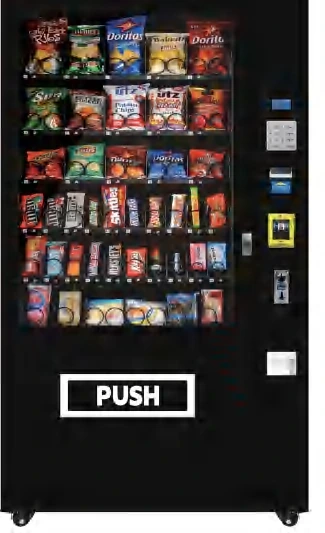
60-Slot Button Vending Machine
No screen, 300 items and a lower entry cost for stable SKU ranges.
View configuration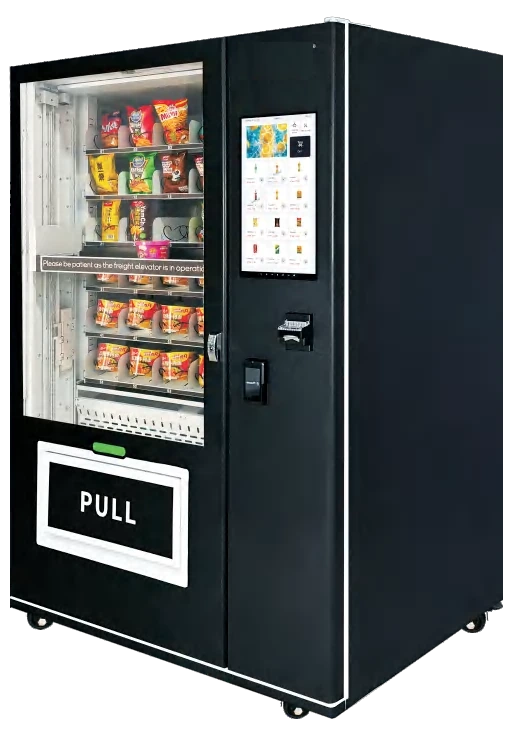 Flagship
Snacks & drinks
54-Slot Elevator Vending Machine
Gentle elevator delivery for fragile, irregular and heavier products.
View detailsFlagshipSnacks & drinks
AA Combo Elevator Vending Machine
Two linked elevator cabinets, 540 items and one payment terminal.
View details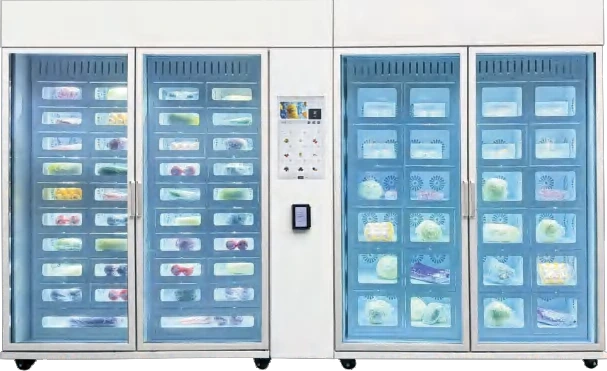
Lockers & smart cabinets
62-Compartment Refrigerated Locker
Sixty-two chilled doors for food, flowers and pharmacy.
View configuration